
Stuga vs Lovelace: Choosing the Right Home Assistant Dashboard
An honest comparison between Stuga and Home Assistant's default Lovelace dashboard. Find out which solution fits your smart home needs.
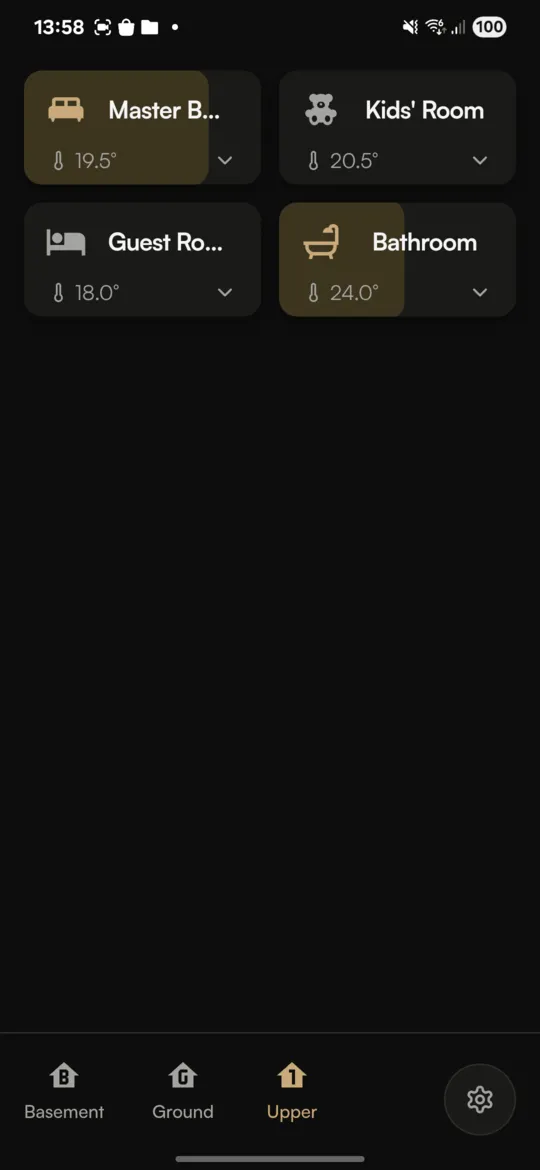
If you're exploring dashboard options for Home Assistant, you've likely encountered Lovelace, the built-in customizable dashboard. You might also be wondering how Stuga compares. Both serve the same fundamental purpose, controlling your smart home, but they take very different approaches.
This comparison aims to be honest about the strengths and limitations of each. Stuga isn't trying to replace Lovelace. They're designed for different priorities. Understanding those priorities will help you choose the right tool, or decide to use both.
Quick Comparison
| Feature | Stuga | Lovelace |
|---|---|---|
| Setup time | Minutes | Hours to days |
| Configuration | Zero YAML required | YAML or visual editor |
| Mobile experience | Mobile-first design | Desktop-first, responsive |
| Customization | Limited, opinionated | Unlimited, highly flexible |
| Card types | Fixed (rooms, devices) | Dozens of built-in + custom |
| Native apps | Yes (iOS, Android) | Via Companion app |
| Local HTTP support | Yes (native apps) | Yes |
| Complex automations | No | Yes |
| Charts/graphs | No | Yes |
| Price | Free | Free |
Philosophy: Opinionated vs Flexible
The fundamental difference between Stuga and Lovelace is philosophical.
Lovelace is a blank canvas. It gives you every possible tool and lets you build exactly what you want. Want a card that shows your washing machine's cycle progress alongside today's weather and your energy consumption? You can build that. The only limit is your imagination and willingness to learn YAML.
Stuga is opinionated. It makes choices for you about how a smart home dashboard should work. Rooms are cards. Devices are toggles. The layout is fixed. You can't add a weather card or energy graph because that's not what Stuga is designed for.
Neither approach is objectively better. It depends on what you value:
- Value customization? Lovelace wins, no contest.
- Value simplicity? Stuga wins by deliberately limiting options.
Setup Experience
Stuga Setup
- Download the app
- Enter your Home Assistant URL
- Log in with OAuth
- Done. Your rooms and devices appear automatically.
Total time: about 2 minutes.
Stuga reads your existing Home Assistant configuration and presents it immediately. If you've organized your devices into areas, those become your rooms. If you haven't, you'll see a flat list of all devices. The app works instantly either way.
Lovelace Setup
Lovelace comes pre-configured with an auto-generated dashboard that shows all your entities. But most users quickly realize they want something more customized:
- Plan your dashboard layout
- Learn about card types (button, entity, grid, stack, gauge, etc.)
- Create views and add cards
- Customize colors, icons, behaviors
- Install custom cards from HACS for additional functionality
- Optimize for mobile (conditional cards, different views)
Total time: hours to days, depending on complexity.
This isn't a criticism. Many users enjoy building their perfect dashboard. It's a satisfying project that results in something uniquely yours. But if you just want a working mobile interface today, the learning curve is significant.
Mobile Experience
This is where Stuga has a clear advantage. It was designed exclusively for phones.
Stuga on Mobile
- 44px+ tap targets throughout
- Single-column layout optimized for one-handed use
- Swipe gestures for navigation
- Controls positioned in thumb-friendly zones
- No pinching or zooming needed
Lovelace on Mobile
- Responsive design that adapts to screen size
- Multi-column layouts collapse on narrow screens
- Tap targets depend on how you configure cards
- Can be optimized with custom CSS and mobile-specific views
- Requires effort to create a good mobile experience
Lovelace can be great on mobile. But you have to make it great. Stuga is great on mobile by default.
Customization Depth
If customization is important to you, Lovelace is the clear choice.
What You Can Do with Lovelace
- Completely custom layouts with rows, columns, and grids
- Dozens of card types: gauges, history graphs, calendars, maps, media players
- Custom cards from the community (via HACS)
- Custom themes with complete visual control
- Conditional cards that appear based on states
- Complex tap actions including service calls and navigation
What You Can Do with Stuga
- Edit room names and icons
- Reorder rooms
- Hide devices
- Organize rooms into floors
- Choose light/dark mode
Stuga's limited customization is intentional. Fewer options mean faster setup and a more consistent experience. But if you want to display weather forecasts, energy consumption, camera feeds, or custom visualizations, Lovelace is your only option.
Performance and Responsiveness
Both solutions use WebSocket connections for real-time updates, so both can be fast.
In practice, Stuga tends to feel snappier because:
- Simpler UI means less to render
- Native apps benefit from platform optimizations
- Focused feature set means less overhead
That said, a well-optimized Lovelace dashboard can be very fast too. Performance depends heavily on how many entities you're displaying and whether you're using resource-heavy custom cards.
Local Network Access
Many Home Assistant users prefer not to expose their installation to the internet. Both solutions support local access, but differently:
Stuga
- Native apps connect directly to local HTTP (no SSL required)
- Web app requires HTTPS
- No need for Nabu Casa or reverse proxy for native apps
Lovelace
- Built into Home Assistant, works wherever HA is accessible
- Home Assistant Companion app handles local connections
- No additional setup needed if you can already access HA
Both work well for local-only setups. The Companion app and Stuga's native apps both handle local connections smoothly.
Use Cases: When to Choose Each
Choose Stuga If...
- You want a working mobile dashboard immediately
- You don't enjoy configuring YAML
- Your primary use is controlling lights and common devices
- You value a clean, minimal aesthetic
- You're frustrated with Lovelace's mobile experience
Choose Lovelace If...
- You want complete control over your dashboard design
- You need to display complex information (graphs, calendars, custom data)
- You enjoy the process of building and tweaking your dashboard
- You're primarily using a tablet or desktop to control your home
- You need features beyond basic device control
Use Both If...
Many users find value in using both:
- Stuga on your phone for quick daily controls while walking around
- Lovelace on a wall tablet for at-a-glance status and detailed information
- Lovelace on desktop for configuration and monitoring
They're not mutually exclusive. Use the right tool for each context.
What About Mushroom Cards?
If you're researching Home Assistant dashboards, you've probably heard of Mushroom cards. They're a popular HACS add-on that provides a modern, mobile-friendly design for Lovelace.
Mushroom bridges some of the gap between Lovelace and Stuga's aesthetics. The cards are well-designed with good touch targets and a clean look. However, you still need to:
- Install and configure the cards
- Build your layout manually
- Maintain the configuration over time
Mushroom is a great option if you want Lovelace's flexibility with better mobile aesthetics. But it's still fundamentally a Lovelace customization, not a zero-config alternative like Stuga.
Conclusion
Stuga and Lovelace solve the same problem differently. Lovelace gives you unlimited power and flexibility. Stuga gives you a polished mobile experience with zero effort.
There's no universal "best" choice. It depends on:
- How much time you want to spend on configuration
- What devices and information you need to display
- Whether you primarily use mobile or desktop
- How much you value customization vs simplicity
If you're reading this article, there's a good chance you're frustrated with something about your current setup. If that frustration is about mobile experience and configuration complexity, give Stuga a try. It's free, and you can be up and running in minutes.
If your frustration is about needing more features and flexibility, Lovelace (perhaps with Mushroom cards) is probably the better investment of your time.
And remember: you don't have to choose just one. Use both where they each excel.